Embedded/Raspberry Pi
[Raspberry Pi] OS 라이팅
다크엔지니어
2021. 5. 9. 13:35
반응형
이번에는 Raspberry Pi 에서 사용 할 수 있는 Linux 를 라이팅 하는 방법을 알아보겠다.
필자는 Raspberry Pi 를 통해 키오스크 모드를 사용할 목적으로 키오스크 모드 셋팅이
가능한 버전이 포함된 Linux 버전을 라이팅 할 것이다.
아래 gitgub 에서 clone 하여 가져올 수 있다.
- 라즈베리파이 키오스크 이미지 다운로드 및 라이팅
https://github.com/futurice/chilipie-kiosk
futurice/chilipie-kiosk
Easy-to-use Raspberry Pi image for booting directly into full-screen Chrome, with built-in convenience features for unattended operation. Perfect for dashboards and build monitors. - futurice/chili...
github.com
아래 경로는 윈도즈 환경 OS 에서 SDcard Write 를 통해 이미지를 만들어 라이팅 할 수 있다.
Raspberry Pi 는 SDcard 를 ROM 메모리로 사용 된다.
- 라즈베리파이 윈도우 이미지 라이터
https://downloads.raspberrypi.org/imager/imager_1.4.exe
위 과정을 진행하게 되면 SSH 혹은 Raspberry Pi Micro HDMI 를 통해 접근하게 되면
리눅스 프롬포트를 접하게 될 것이다.
아래 와 같이 버전을 확인 할 수 있다.
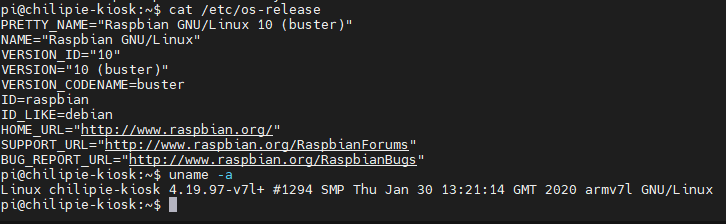
필자는 buster 버전을 라이팅 하였다.
반응형